
My Concern - Could I lose it?
My .zshrc has evolved into something I actually care about. Custom aliases, plugin configurations, path exports—the kind of tweaks you don't realize you depend on until you're setting up a new machine and starting from scratch. That, paired with the fact that I understand the config only in theory and am barely better than copy-pasting lines from reddit/stackoverflow, would make losing my config also lose HOURS of work.
I wanted version control for my shell config. But more importantly, I wanted it to happen automatically. Because I'll be honest—I'm never going to remember to commit my dotfiles manually.
The Project
My ideal solution would need a few things:
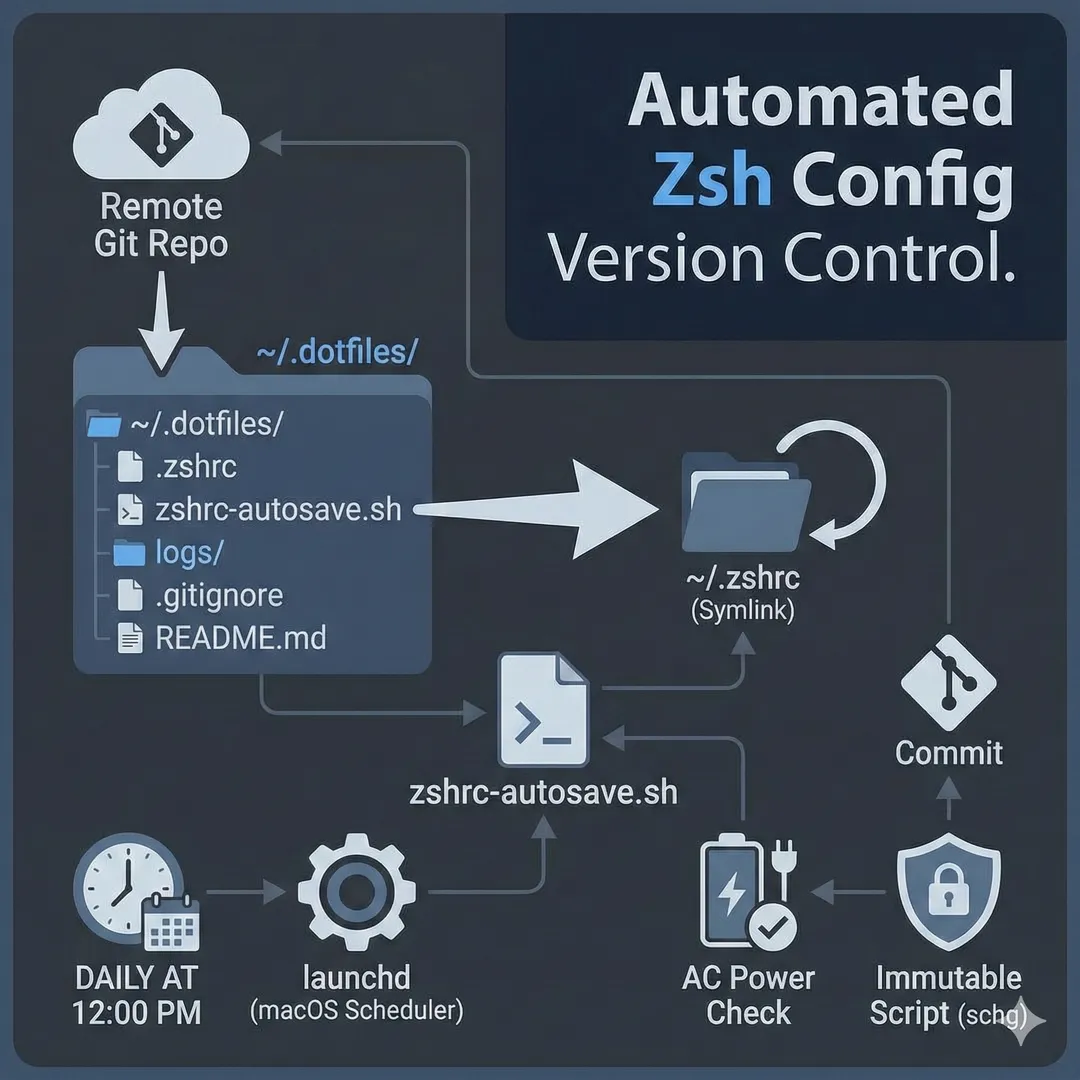
- Git repository for version history and remote backup
- Symlinks so the config lives in the repo but zsh finds it in
~ - Automated commits without manual intervention
- Battery-aware — don't drain laptop power for background tasks - don't know if this matters at all lol, probably not.
- Security — lock down the automation script from tampering. Don't know how important that is, but couldn't hurt right?
Repository Structure
The repo lives at ~/.dotfiles rather than somewhere in ~/Desktop or ~/Documents. This matters on macOS—those directories are protected, and launchd can't run scripts from them without granting Full Disk Access.
~/.dotfiles/
├── .zshrc                    # The actual config
├── zshrc-autosave.sh         # Auto-commit script
├── logs/                     # Commit logs (gitignored)
├── .gitignore
└── README.md
The symlink connects everything:
~/.zshrc → ~/.dotfiles/.zshrcWhen I edit ~/.zshrc, I'm actually editing the file in the repo. Git sees the changes.
The Auto-Commit Script
The script is intentionally minimal. Check for changes, commit if found, push to remote. The key addition: skip everything if running on battery.
#!/bin/sh
# zshrc-autosave.sh
# Auto-commits zshrc changes daily (only on AC power)

# Only run if on AC power
if ! pmset -g batt | grep -q "AC Power"; then
    exit 0
fi

DOTFILES_DIR="$HOME/.dotfiles"

cd "$DOTFILES_DIR" || exit 1

git add -A
git diff --cached --quiet || git commit -m "Auto-commit $(date +%Y-%m-%d\ %H:%M)"
git push
git diff --cached --quiet exits if there are no staged changes, so the commit only runs when something actually changed. No empty commits.
Scheduling with launchd
macOS's launchd handles the scheduling. The plist runs the script daily at noon:
<?xml version="1.0" encoding="UTF-8"?>
<!DOCTYPE plist PUBLIC "-//Apple//DTD PLIST 1.0//EN" "http://www.apple.com/DTDs/PropertyList-1.0.dtd">
<plist version="1.0">
<dict>
    <key>Label</key>
    <string>com.yourusername.zshrc-autosave</string>
    <key>ProgramArguments</key>
    <array>
        <string>/bin/sh</string>
        <string>/Users/yourusername/.dotfiles/zshrc-autosave.sh</string>
    </array>
    <key>StartCalendarInterval</key>
    <dict>
        <key>Hour</key>
        <integer>12</integer>
        <key>Minute</key>
        <integer>0</integer>
    </dict>
    <key>StandardOutPath</key>
    <string>/Users/yourusername/.dotfiles/logs/autocommit.log</string>
    <key>StandardErrorPath</key>
    <string>/Users/yourusername/.dotfiles/logs/autocommit.error.log</string>
</dict>
</plist>
The plist lives at ~/Library/LaunchAgents/com.yourusername.zshrc-autosave.plist and loads on login.
Locking It Down
I see an auto-running script is a potential attack vector. If someone modifies it, they get code execution every day at noon. I don't know how large of an attack surface this makes(not in cyber security), so I decided to lock it down with immutable flags. Once it's working, I never need the script to change assuming no MacOS breakage.
# Root ownership
sudo chown root:wheel ~/.dotfiles/zshrc-autosave.sh

# Immutable flag - can't be modified even by root without removing it first
sudo chflags schg ~/.dotfiles/zshrc-autosave.sh
To edit the script later:
# Unlock
sudo chflags noschg ~/.dotfiles/zshrc-autosave.sh

# Make edits...

# Re-lock
sudo chown root:wheel ~/.dotfiles/zshrc-autosave.sh
sudo chflags schg ~/.dotfiles/zshrc-autosave.sh

Not listed here, but I also have a lock on the launchd service as well.
Learning experiences
A few things I ran into:
- Protected folders — Scripts in
~/Desktop,~/Documents,~/Downloads, etc. won't run via launchd without Full Disk Access. Moving to~/.dotfilessolved this. - /bin/bash vs /bin/sh — Explicitly calling
/bin/shin the plist's ProgramArguments avoids some macOS security restrictions I ran into.
Results
Now my zsh config backs itself up. Every change I make is automatically committed and pushed to a remote repo once a day—but only when I'm plugged in, and only if something actually changed.
Setting up a new machine becomes: clone the repo, create the symlink, done. No more "what was that alias I had?" moments.
Total setup time: about 30 minutes. Peace of mind: priceless. 😄


