
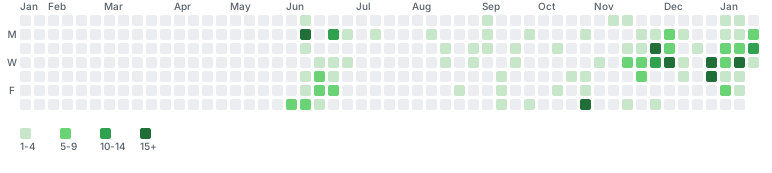
I'm a fan of self-hosting. This fandom, my desire to challenge myself, and a pinch of paranoia led me to self-host my own GitLab instance.
The details of self-hosting GitLab will be left for another article, but suffice to say, it's been 3 years and I love the experience. From setting up lxc runners, to working out logs, to implementing 3-2-1 strategies, it's been great.
However, I've always wondered how many people look at GitLab activity. Does it matter? Am I hamstringing myself from potential PR approvals or opportunities because I find myself in my own GitLab more and more?
Probably not, but in a moment of FOMO and about 30 minutes, I created a cronjob that uploads to GitHub once a week. Was it fun? Yes. 30 minutes of time spent (wasted?) on something cheesy? Debatable.
Nevertheless, I made it all the same. :)
The SVG
When I say simple, I mean it. The SVG was the hardest part:
def get_color(count):
    """GitHub-style green based on fixed thresholds."""
    if count == 0:
        return "#ebedf0"
    elif count < 5:
        return "#c8e6c9"  # lightest
    elif count < 10:
        return "#69d375"
    elif count < 15:
        return "#30a14e"
    else:
        return "#216e39"  # darkest
The SVG itself is just nested loops - 53 weeks by 7 days, each cell colored by contribution count:
for week in range(53):
    for day in range(7):
        date_str = current_date.strftime("%Y-%m-%d")
        count = counts.get(date_str, 0)
        color = get_color(count)

        svg_parts.append(
            f'<rect x="{x}" y="{y}" width="11" height="11" '
            f'rx="2" fill="{color}"><title>{date_str}: {count}</title></rect>'
        )
The Cronjob
It runs once a week:
# Monday 7am
0 7 * * 1 /home/jacob/docker/activity-cronjob/venv/bin/python /home/jacob/docker/activity-cronjob/generate_graph.py
Scoped Keys
With a GitLab key scoped to only reading my commit frequency, pushed to GitHub with a key limited to only being able to edit my readme:
# GitLab: read_api scope only - can't push, can't see private repos
GITLAB_TOKEN = os.getenv("GITLAB_TOKEN")
headers = {"PRIVATE-TOKEN": GITLAB_TOKEN}

# GitHub: deploy key with write access to ONE repo
# No PAT, no access to anything else
ssh_cmd = f'ssh -i {deploy_key} -o StrictHostKeyChecking=no'
env['GIT_SSH_COMMAND'] = ssh_cmd
HashiCorp Vault Integration
Finally, to top it off, this gave me a reason to play with my new implementation of HashiCorp Vault. Not because I needed it per-se (keys are very limited in scope, VMs are local-only), but because it gave me a low-friction, low-risk space to test out passing env vars:
import hvac

def get_secrets_from_vault():
    client = hvac.Client(url=os.getenv("VAULT_ADDR"))
    client.token = os.getenv("VAULT_TOKEN")

    secret = client.secrets.kv.v2.read_secret_version(
        path="activity-cronjob",
        mount_point="secret"
    )

    return {
        "GITLAB_TOKEN": secret["data"]["data"]["gitlab_token"],
        "GITLAB_URL": secret["data"]["data"]["gitlab_url"],
    }
Fallback Handling
And finally, if the script ever detects GitLab is unreachable it'll comment out the readme section with the activity tracker. Might as well cover my tracks since i'm doing this for myself:
def remove_gitlab_from_readme():
    """Remove GitLab section from README if GitLab is unreachable."""
    # Clone, regex out the section, push
    readme = re.sub(
        r"Do people read readme's.*?#### Gitlab Activity\s*!\[GitLab Activity\]\(gitlab-activity\.svg\?v=\d+\)\s*",
        "",
        readme,
        flags=re.DOTALL
    )
I also did a bit of overengineering and if the svg doesn't update in 60 days, a GitHub Action removes the section from my readme:
name: Check stale activity

on:
  schedule:
    - cron: '0 0 * * 0'  # Weekly

jobs:
  check:
    runs-on: ubuntu-latest
    steps:
      - uses: actions/checkout@v4

      - name: Check last modified
        id: check
        run: |
          LAST_MODIFIED=$(git log -1 --format=%ct -- gitlab-activity.svg)
          NOW=$(date +%s)
          DAYS_OLD=$(( (NOW - LAST_MODIFIED) / 86400 ))
          [ "$DAYS_OLD" -gt 60 ] && echo "stale=true" >> $GITHUB_OUTPUT

      - name: Remove stale section
        if: steps.check.outputs.stale == 'true'
        run: |
          sed -i '/<!-- GITLAB START -->/,/<!-- GITLAB END -->/d' README.md
          git config user.name "github-actions"
          git config user.email "github-actions@github.com"
          git add README.md
          git commit -m "chore: remove stale gitlab activity"
          git push
A fun little project that used the tools I already had, helped me break into Vault, and wrapped up into a neat result. Overall, a good evening well spent.


