
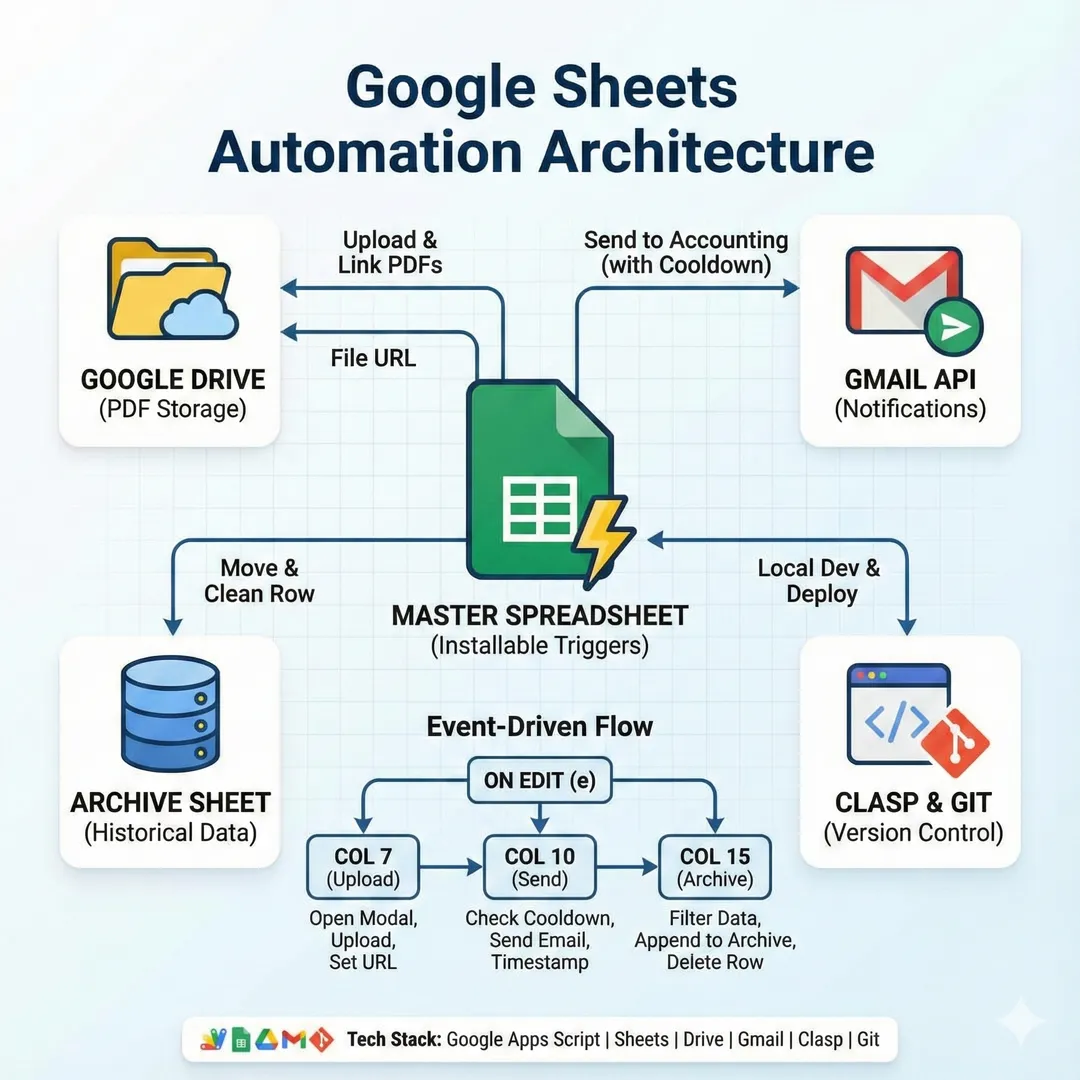
Tech Stack
- Platform: Google Apps Script
- Spreadsheet: Google Sheets with installable triggers
- Storage: Google Drive for PDF uploads
- Email: Gmail API for automated notifications
- Development: Clasp for local editing and Git version control
The Problem
The team tracked estimates in a Google Sheet but everything was manual—updating timestamps, uploading PDFs to Drive, copying links back, emailing accounting when approved. Steps got skipped, timestamps were inconsistent, and accounting sometimes got the same estimate twice.
Spreadsheet Architecture
I designed a 15-column tracker where specific columns trigger automated actions:
| Column | Purpose | Automation |
|---|---|---|
| A (1) | Status dropdown | Triggers timestamps in K, L, N |
| B (2) | Client name | Used in email subject/body |
| C (3) | Access code | Included in accounting email |
| F (6) | Amount | Included in accounting email |
| G (7) | Upload checkbox | Opens file upload modal |
| H (8) | Estimate PDF link | Auto-populated after upload |
| I (9) | PO PDF link | Auto-populated (optional) |
| J (10) | Send to accounting checkbox | Sends email with all details |
| K (11) | "Awaiting Estimate" date | Auto-set, never overwritten |
| L (12) | "Estimate Sent" date | Auto-set, never overwritten |
| M (13) | Email sent timestamp | Cooldown tracking |
| N (14) | Last status update | Always updated on status change |
| O (15) | Archive checkbox | Moves row to Archive sheet |
Event-Driven Architecture
A single installable trigger handles all automation. Every edit is routed based on which column changed:
function onEditInstallable(e) {
  const sheet = e.source.getActiveSheet();
  const editedColumn = e.range.getColumn();
  const editedValue = e.range.getValue();

  if (editedColumn === 7 && editedValue === true) {
    fileUpload(e.range);
  }
  if (editedColumn === 10 && editedValue === true) {
    sendToAccounting(e.range);
  }
  if (editedColumn === 15 && editedValue === true) {
    archiveRow(e.range);
  }
}
File Upload Flow
Clicking the upload checkbox opens a modal where users select PDFs. Files are base64-encoded client-side, sent to Apps Script, decoded, uploaded to a specific Drive folder, and the resulting URL is written back to the row—all without leaving the spreadsheet.
function uploadToDrive(fileData, fileName, column) {
  const blob = Utilities.newBlob(
    Utilities.base64Decode(fileData.split(",")[1]),
    "application/pdf",
    fileName
  );
  const file = DriveApp.getFolderById(FOLDER_ID).createFile(blob);

  const sheet = SpreadsheetApp.getActiveSpreadsheet().getActiveSheet();
  sheet.getRange(sheet.getActiveRange().getRow(), column)
    .setValue(file.getUrl());
}
Duplicate Email Prevention
Users sometimes double-click checkboxes or toggle them while troubleshooting. A 20-second cooldown prevents duplicate emails to accounting:
const lastSent = sheet.getRange(row, 13).getValue();
if (lastSent instanceof Date) {
  const timeElapsed = new Date() - lastSent;
  if (timeElapsed < 20000) return; // Skip if sent in last 20 seconds
}
Timestamp Preservation
Milestone timestamps ("Awaiting Estimate", "Estimate Sent") are set once and never overwritten—important for tracking how long each stage takes. Only "Last Status Update" gets refreshed on every change:
if (editedValue === "Awaiting Estimate") {
  const cellK = sheet.getRange(editedRow, 11);
  if (!cellK.getValue()) { // Only set if empty
    cellK.setValue(currentTime);
  }
}
Archive with Data Cleanup
When archiving, checkbox columns are stripped out since they're not meaningful in historical data. The filtered row goes to the Archive sheet and gets deleted from the tracker:
const rowData = sheet.getRange(editedRow, 1, 1, 14).getValues()[0];
const filteredRowData = rowData.filter((_, i) => ![0, 6, 9].includes(i));
archiveSheet.appendRow(filteredRowData);
sheet.deleteRow(editedRow);
Results
The team went from 5+ manual steps per estimate to checkbox clicks. Timestamps are consistent, Drive links populate automatically, accounting gets exactly one email per approval, and completed work archives cleanly for reporting.


