
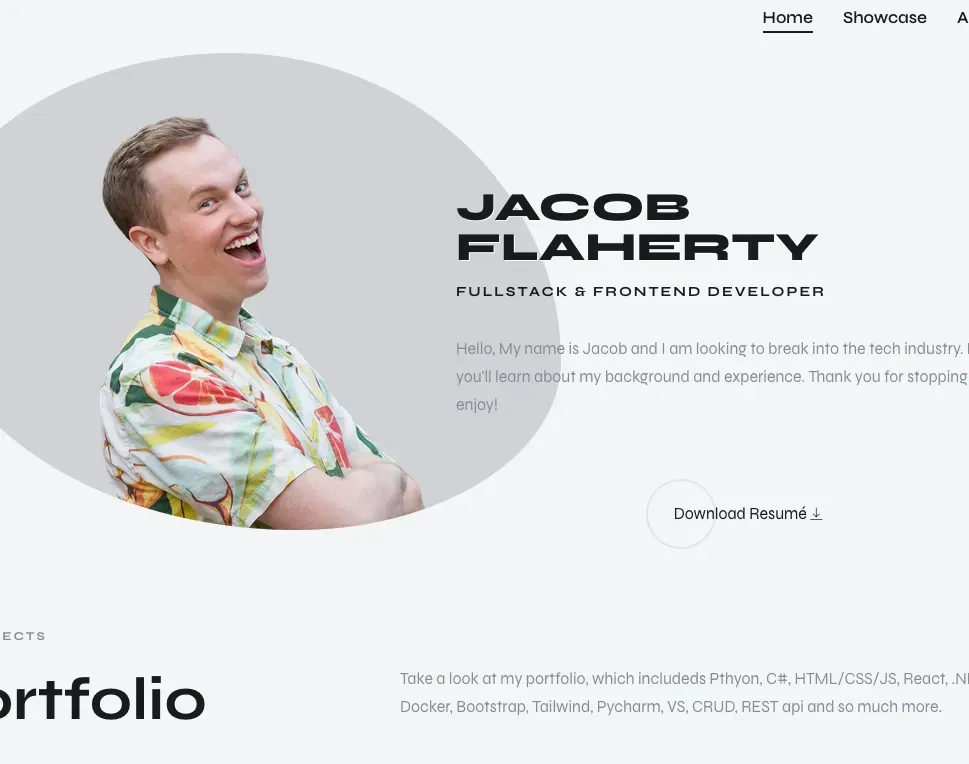
I recently decided to update my portfolio website. I wanted something that felt personal and unique, a testament to my current skills and quirkiness. I also wasn't impressed with the CMS options I'd been researching. They were often too robust to learn efficiently or cost more than I was willing to pay for light use.
The result is this site and a custom (and simple) backend. It runs on Next.js with PocketBase hosted on my Proxmox cluster. I added some fun touches like the morphing profile image and confetti to demonstrate my quirkiness. Oh, and dad jokes! Here's how it all works.
Tech Stack
- Frontend: Next.js 16 (App Router), React 19, TypeScript
- Styling: Tailwind CSS + Custom CSS
- Backend: PocketBase (self-hosted on Proxmox)
- Analytics: PostHog
- Deployment: GitLab CI/CD → Vercel
Self-Hosted PocketBase Backend
I'm a fan of self-hosting. Could I have used a hosted CMS or headless solution? Sure. But I wanted full control over the data and API, plus I like having everything in one place I manage myself. What's also often not discussed is that many backed services require a minimum use on the free tier, or they shutdown (supabase and convex are good examples). With my budget and resources, I found self-hosting to be the best and most reliable fit.
PocketBase ended up being perfect for this. It's basically SQLite with a REST API, an admin dashboard for managing content, and built-in auth and file storage. For a portfolio site where I'm the only one writing content, it's precisely what I needed without any of the overhead of a bigger CMS.
Posts are fetched server-side with Incremental Static Regeneration (ISR). I set a 5-minute revalidation window, so pages are statically generated but content updates without rebuilding the whole site:
// Page-level ISR configuration
export const revalidate = 300; // Revalidate every 5 minutes

const posts = await pb.collection('posts').getList(1, 20, {
  filter: 'status="published"',
  sort: '-published_at',
  expand: 'tags'
});
The backend lives on a single server in my homelab. I implemented aggressive edge caching using a technique from another project. It's not like I needed global performance for a portfolio site (odds are nobody's hiring me from Asia), but I thought it was neat and wanted to see if it would work. I tested the site from different locations using Kasm and VPNs (Mongolia, China, Russia). While I don't fully understand all the ins and outs of edge caching, I noticed load times drop from around 1.5 seconds to 400ms after the initial request.
The solution was aggressive caching at the edge. I built an API proxy route that fetches images from PocketBase and sets a 1-year immutable cache header:
return new NextResponse(buffer, {
  headers: {
    'Content-Type': contentType,
    'Cache-Control': 'public, max-age=31536000, immutable',
  },
});
Vercel's edge network handles the distribution. The first request to an image hits my homelab, then it's cached globally. This gives me CDN-level performance without managing a CDN myself.
Tag System with Categories
I wanted tags to group logically when displayed. Languages together, frameworks together, services together. This makes it easier to scan the tech stack at a glance.
Tags are stored in PocketBase with a category field. Each tag has a name, slug, color, and category (language, framework, service, platform, infrastructure, or concept):
interface Tag {
  id: string;
  name: string;
  slug: string;
  color: string;
  category: 'language' | 'framework' | 'service' | 'platform' | 'infrastructure' | 'concept';
}
Tags are sorted by category before rendering:
const sortedTags = [...tags].sort((a, b) => {
  const order = ['language', 'framework', 'service', 'platform', 'infrastructure', 'concept'];
  return order.indexOf(a.category) - order.indexOf(b.category);
});
Morphing Profile Image
The hero section has a morphing effect on the profile image using CSS border-radius animation. It cycles through different organic shapes to add some motion without being distracting:
.transform-banner img {
  animation: border-transform 10s linear infinite alternate;
  border-radius: 100%;
}

@keyframes border-transform {
  0%, 100% { border-radius: 63% 37% 54% 46%/55% 48% 52% 45%; }
  14% { border-radius: 40% 60% 54% 46%/49% 60% 40% 51%; }
  28% { border-radius: 54% 46% 38% 62%/49% 70% 30% 51%; }
  42% { border-radius: 61% 39% 55% 45%/61% 38% 62% 39%; }
  56% { border-radius: 61% 39% 67% 33%/70% 50% 50% 30%; }
  70% { border-radius: 50% 50% 34% 66%/56% 68% 32% 44%; }
  84% { border-radius: 46% 54% 50% 50%/35% 61% 39% 65%; }
}
Here it is in action:
Confetti Celebration
The "Hire Me" button triggers a confetti animation when clicked using the canvas-confetti library:
import confetti from 'canvas-confetti';

const handleHireClick = () => {
  confetti({
    particleCount: 100,
    spread: 70,
    origin: { y: 0.6 }
  });
};
Dynamic Text Contrast
Tag colors are stored in PocketBase. To avoid manually picking text colors for each tag, I calculate the text color automatically based on the background's luminance:
function getContrastTextColor(hexColor: string): string {
  const hex = hexColor.replace('#', '');
  const r = parseInt(hex.substring(0, 2), 16);
  const g = parseInt(hex.substring(2, 4), 16);
  const b = parseInt(hex.substring(4, 6), 16);

  const luminance = (0.299 * r + 0.587 * g + 0.114 * b) / 255;
  return luminance > 0.5 ? '#1a1a2e' : '#fff';
}
This keeps tags readable regardless of the color assigned, and allows changing tag colors in PocketBase without modifying code.
CI/CD Pipeline
The repo lives on my self-hosted GitLab instance with a runner on the same Proxmox cluster that runs PocketBase. Pushes to main trigger linting, type checking, and deployment to Vercel:
stages:
  - lint
  - deploy

lint:
  script:
    - pnpm install
    - pnpm lint
    - pnpm build

deploy:
  script:
    - vercel --prod --token $VERCEL_TOKEN
This setup lets me control the source and backend while Vercel handles the frontend hosting and edge caching.


